Make your Stories visible on Google
Web Stories are simply web pages under the hood! Now let's see how you can be the system's best friend.
Here is what to take into consideration when working with SEO
- Ensure that your Web Stories, like other pages on your website, are linked from inside your website so that your users and bots can find them.
The following fields are necessary for Web Stories to appear on Google Discover:
- Portrait-poster
- Publisher
- Publisher-logo
- Title
They are used to generate your Story cover as shown in the discover carousel, which is the first thing a user sees when deciding whether to consume your Story.
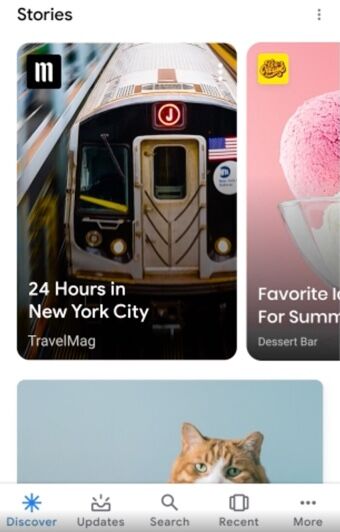
💡Tip: You can add or edit your publisher logo in Slidy's Settings page
We have listed a few useful tips and links below to help you with your ideal setup:
- The publisher name field should include no more than 20 characters to avoid truncation.
- The publisher logo file must be a raster picture, such as JPEG or PNG, and no animation is permitted.
- You may use Google's Web Stories Test tool to verify if your Story has all Google-required information for Google Discover and Search in particular.
You can find more info about Google Web Creators using this link
💡Tip: Links to and from your own website as well as links to other websites are an essential component of how Google ranks your Web Stories
- Last but not least; the quality of the content. This will always be the most important SEO tactic.
💡Tip: Google recommends that the acceptable range of slides falls between 11-15